How to add arabic language (or others) in windows 10
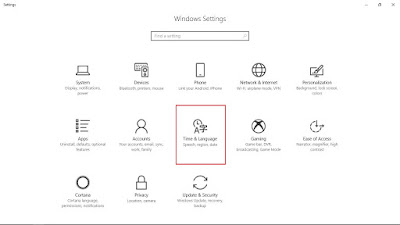
بِسْمِ اللَّهِ الرَّحْمَنِ الرَّحِيم Bismillahirrahmanirrahim [In the Name of Allah, the Most Gracious, the Most Merciful] 1. Go to settings (you can search in windows start menu) 2. Select "Time & Language" 3. Select "Region & Language" 4. Click "Add a language" 5. Now you can choose whatever language you want (for me i choose Arabic ) 6. After that, choose your region. 7. And that's it. 8. You can check the language you are using now at the taskbar. 9. That will list all language you are added. 10. For short-cut keyboard to change language, press "windows+spacebar" 11. You can test the language character at notepad. 12. The arrangement of character in keyboard can be refer at "on-screen keyboard" 13. You can search "on-screen keyboard" in the windows start menu If you found this helpful, say الحَمْدُ للهِ Alhamdulillah [Praise be to Allah]